👁️ Real visible tabs
RTO controls normal browser tabs the user can see, focus and inspect. It is designed for supervised workflows, not hidden browser farms.
RTO is not a blanket replacement for Selenium or WebDriver. It is a lighter option when the real need is local, visible browser control with named tabs, clear operator feedback and less infrastructure.
RTO controls normal browser tabs the user can see, focus and inspect. It is designed for supervised workflows, not hidden browser farms.
A trusted page talks to the local extension bridge. For many internal flows, that is simpler than maintaining drivers, grids or remote runners.
RTO is built around visible control and allow-listed hosts. The user should understand what is being controlled and why.
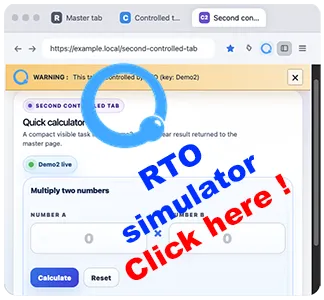
The live simulation shows the RTO model in the browser: a master tab, controlled visible tabs, a warning bar, a safety overlay and a result returned to the master page.
It helps you evaluate whether your need is a supervised local workflow or a full Selenium-style automation stack.
Launch the live simulationFor many practical workflows, a browser extension and a page script are easier to deploy than a full Selenium-based environment.
The target tab remains real, visible and understandable during demos, support sessions, internal operations and QA checks.
Explicit host boundaries and local execution keep the model readable instead of moving everything into hidden remote infrastructure.
Start fast with the browser-side SDK.
Open SDKRead the public contract, allow-list notes and examples.
Open docsTry copy-paste starter examples and live demos.
Browse examplesSee where RTO fits against recorder tools and Selenium-style stacks.
Open compare