Your page stays the controller. It sends clear requests and receives visible results from the tab it controls.
🧭 Practical overview
How Remote Tab Opener works
RTO lets your own page act as a master tab, send local requests through the extension bridge, and control named real browser tabs across explicitly allowed domains.
The important part: controlled tabs stay visible. The user can see what opens, what receives focus, and when RTO is active.
RTO does not hide controlled tabs. The browser remains inspectable, focusable and understandable.
RTO is deny-by-default. A host must be explicitly approved before it can be controlled.
🎬 No-install preview
See the model before installing the plugin
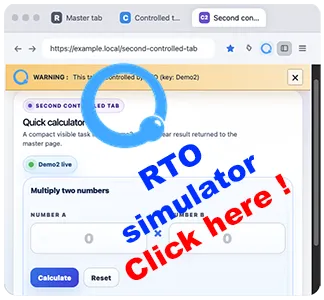
The live simulation shows a master tab opening visible controlled tabs, displaying the warning bar, using the RTO overlay and returning a result to the master tab.
Launch the live simulation🔎 What RTO actually does
A local bridge for visible tab workflows
Remote Tab Opener is a local browser extension. It gives your own page a safe bridge to open, reuse, navigate, focus and automate real browser tabs, including tabs on other explicitly allowed domains.
Your page orchestrates the workflow, the extension enforces the rules, and the target action happens in a dedicated visible tab.
🧩 Core model
The main concepts you need first
🏠 master tab
👁️ controlled tab
tabKey
🛡️ allow-list
💻 local-first
The page you own. It sends the requests, receives the results, and can register itself as the place to return focus after a remote step.
A real browser tab opened or adopted by RTO. It can live on another allowed domain and remains a normal visible tab.
A stable name for a logical tab lane. Use it to reuse the same tab intentionally instead of spawning duplicates for every action.
A target host must be explicitly allowed before the extension will control it or run DOM actions there.
💻 Local-first model
Why the local model matters
- No server or proxy is needed to drive the tab.
- No cloud relay sits between your page and the browser.
- No data collection is required for the core product model.
- Browser security boundaries still matter.
- Debugging stays concrete because the tab is visible and local.
Your page
Local controller, SDK or helper-based script on a trusted page.
Extension bridge
RTO checks permissions, routes requests and enforces the allow-list.
Visible tab
The controlled action happens in a real browser tab the user can see.
👁️ Why real tabs matter
RTO is useful when visibility is part of the requirement
RTO favors explicit actions and selectors over black-box recordings.
RTO adds named tab reuse, routing, focus control and safe DOM actions.
For many browser-side workflows, a visible local tab is simpler than a backend runner.
🚀 Where to start
Pick the right entry point
SDK
Use the SDK if you want the easiest start. Move to helper packs later when you need finer control.
Open SDKExamples
Use the examples if you want to see browser behavior first and read code second.
Browse examplesHelpers
Use individual helpers or helper packs when you want more control over what you include.
Open helpers guideCompare
Use the comparison page when you want a quick decision guide before choosing an automation approach.
Compare approaches🧭 Related guides