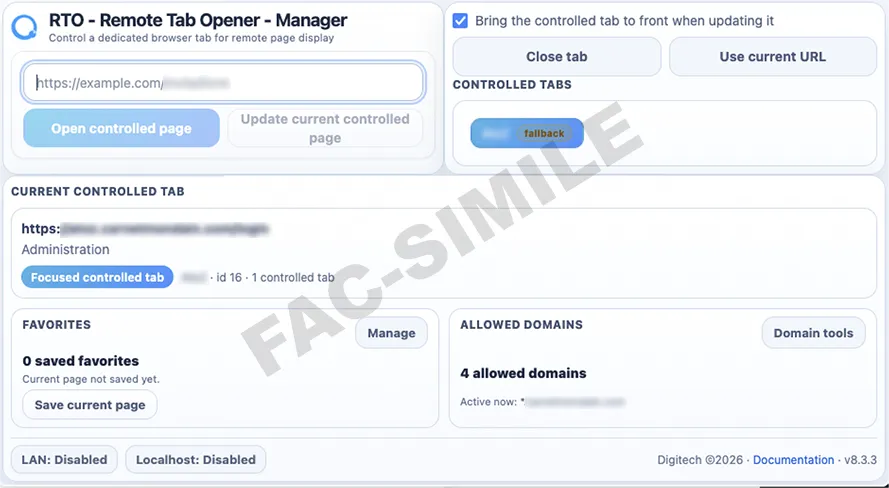
Master page
Control panel
The master tab opens, focuses and closes visible remote tabs. Disabled buttons become active only when a controlled tab exists.
A second controlled tab can also be opened visibly from the master page.
This standalone page demonstrates the normal user-facing behavior of Remote Tab Opener: a master page opens visible controlled tabs, focuses them, closes them, and shows exactly when a tab is under RTO control.
RTO never hides controlled tabs. You always see what is happening.
Demo1transparentlocalmanualReady. Press Start to play the simulation.
Controlled tabs are opened in front of the user, not hidden in the background.
The warning bar and RTO overlay make the controlled state visible at all times.
This live simulation shows the user experience before installing the real plugin.
When RTO controls a tab, the page displays an orange warning bar such as “This tab is controlled by RTO (key: Demo1)”. This is normal, intentional and transparent: the user can see that the tab is controlled.
The master page opens visible remote tabs, focuses them, closes them and receives simple visible results from the demonstration pages. Nothing is hidden in a background browser.
Demo1 fills a small form and shows the moving cursor with yellow highlight. Demo2 uses a small multiplication calculator to show a simple visible action and a result returned to the master page.
This page is a public fac-simile. It explains the experience without exposing internal plugin logic. The simulated plugin panel, spinner, overlay and warning bar are only visual explanations. The real plugin is not required to run this demonstration.